

Patch management closes the software gaps attackers use to break into small businesses. Here is how it works and how to start, in plain English
A Westchester accountant opens her firm on a Monday and finds the screens locked, the files encrypted, and a ransom note in her email. The attacker did not pick her name out of a hat. A scanner found her aging file server, matched it to a vulnerability that had a fix available for months, and walked in. Almost 9 in 10 breaches at small and midsize firms now involve ransomware, and 32 percent of those attacks in 2025 began with a software flaw that nobody had patched. The good news is that the single most effective defense against that scenario is also one of the cheapest.
Key Takeaways
● Patch management means routinely finding, testing, and installing the security updates that software vendors release.
● Vulnerability exploitation now accounts for 20 percent of all breaches, up 34 percent year over year according to industry breach reporting.
● Attackers move faster than ever: the average time from patch release to active attack has fallen from 745 days to just 44 days.
● Typical SMB breaches land in a six-figure to low-seven-figure range, with downtime often outpacing the headline figure.
● Most of the gap can be closed with a simple monthly cadence, asset inventory, and automation, even at a five-person firm.
Patch Management, in Plain English
Software vendors release fixes whenever they discover a flaw that attackers could use. Those fixes are called patches. The discipline of making sure those updates actually get installed across every laptop, server, router, and application a business runs has a name: patch management. For a deeper technical primer on what is patch management at the process level, there is a thorough guide that walks through the full lifecycle from asset inventory to documentation.
For the local Westchester audience, the practical version is simpler. A patch is the manufacturer saying “we found a way someone could break in, and here is how to lock that door.” The job of patching closes those doors quickly enough that no one walks through them first. Cybersecurity has been on the radar of county leadership for years, with Westchester’s cybersecurity task force explicitly named to help municipalities and businesses keep pace with evolving threats.
Why This Matters More in 2026 Than It Did Two Years Ago
The window between a vendor releasing a fix and attackers actively weaponizing the underlying flaw has collapsed. Six years ago, defenders had the better part of two years before they typically saw exploitation. By 2025, they have about six weeks.
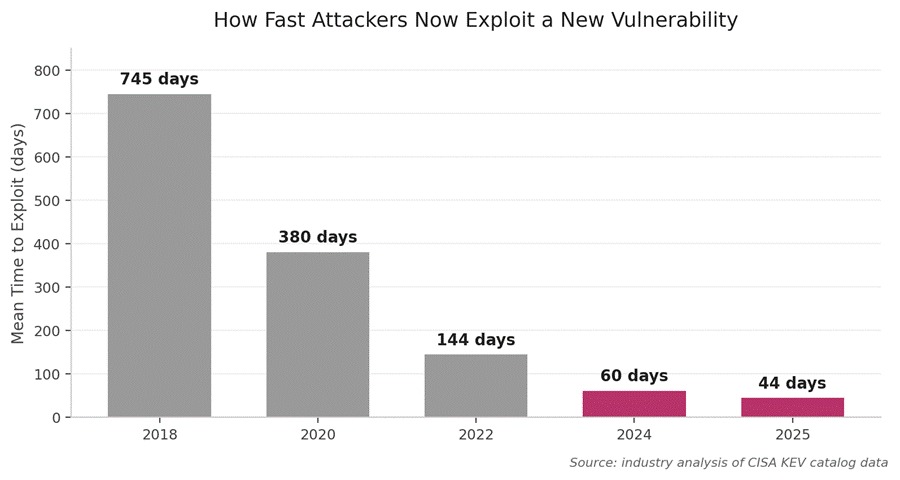
Recent analysis of the federal CISA Known Exploited Vulnerabilities catalog found that more than 80 percent of exploited flaws are n-days, meaning the patch already exists. The cybercriminals are not relying on exotic zero-day discoveries. They are scanning the internet for businesses that have not yet applied a fix that has been sitting in a vendor portal for weeks.
The Real Cost of Skipping a Patch for a Small Business
Headline numbers about average breach costs hover near $4.44 million globally and over $10 million in the United States. Those figures reflect large enterprises and rarely match what a 25-person law firm or 80-person manufacturer actually pays when something goes wrong. The numbers below are closer to ground truth for SMBs.
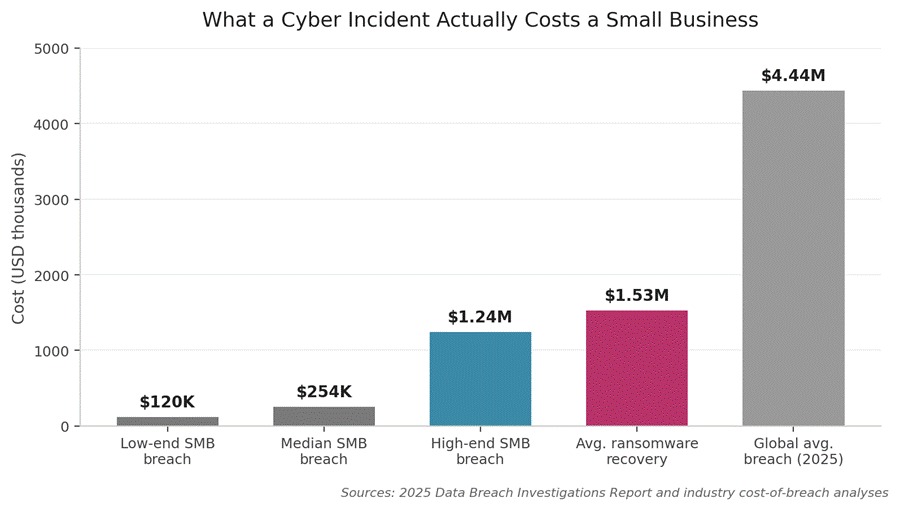
The 2025 Data Breach Investigations Report found the typical small business incident lands between $120,000 and $1.24 million, depending on size, sector, and how prepared the team was. A separate analysis of companies with 25 to 299 staff put the average attack cost at $254,445, with the worst cases reaching $7 million. And downtime, the period when staff cannot work, often eclipses every other line item: industry estimates put it at roughly 50 times the cost of the ransom itself.
| What stings most: 60 percent of small businesses that suffer a major cyberattack close within six months. Many never reopen because cyber insurance now refuses coverage for firms without basic controls in place, and patching sits at the very top of any underwriter’s checklist. |
How Patch Management Actually Prevents Costly Breaches
The mechanism is direct. Attackers run automated scanners across the public internet, looking for systems running software with known weaknesses. When a fix gets installed before the scanner finds the business, the door is closed. When it does not, the door is open. Five things change once a steady routine takes hold:
● Removes the easy wins. Most attacks against small businesses are opportunistic, not targeted. Closing known holes pushes the attacker to look for someone else.
● Shrinks the blast radius. Patched systems contain a breach to a single endpoint rather than letting it spread laterally to file servers, email, and backups.
● Keeps cyber insurance valid. Most carriers now require evidence of regular patching, and a missed critical update can void a claim.
● Protects compliance posture. HIPAA, PCI DSS, and state data protection laws like New York’s SHIELD Act all expect timely patching as part of reasonable security.
● Reduces ransomware odds. Nearly a third of ransomware in 2025 started with an exploited vulnerability, the leading technical entry point.
Video: A Five-Minute Patch Management Explainer
Embed: https://www.youtube.com/watch?v=NvOwsO-GtiM
A quick five-minute walkthrough that explains the concept without jargon. Useful viewing for any owner or office manager who wants the basics before sitting down with their IT provider.
Why Small Businesses Struggle to Keep Up
The threat is well understood. The reasons firms fall behind anyway are very practical. Each one has a workaround that does not require an enterprise budget.
● Nobody owns it. When patching is everyone’s job, it is no one’s. Assigning a single owner, even part-time, is the most effective first move.
● Asset blindness. Most owners cannot list every piece of software running across their company. A simple inventory spreadsheet is enough to start.
● Fear of breakage. Patches occasionally cause issues. Testing on one or two devices before a wider rollout solves this almost entirely.
● Remote and BYOD devices. Staff working from home or on personal laptops often miss updates. A cloud-based agent fixes this without involving the user.
A Realistic Starter Checklist for Local Businesses
The point of this checklist is to make progress, not perfection. A business that completes the first three items is already ahead of the majority of its peers.
| Step | What to Do | Time Needed |
| 1. Inventory | List every laptop, server, network device, and software application in a spreadsheet. | 1 to 3 days |
| 2. Assign ownership | Name one person responsible for monthly patching, even if it is outsourced. | 30 minutes |
| 3. Enable auto-updates | Turn on operating system and browser auto-updates on every device. | 2 hours |
| 4. Set a monthly cadence | Pick the second Tuesday of each month, the standard release day for major patches. | Recurring |
| 5. Cover the third-party apps | PDF readers, browsers, video conferencing tools, accounting software, and similar applications need attention separately. | Recurring |
| 6. Verify with a scan | Use a free vulnerability scanner once a quarter to confirm what was missed. | 1 hour quarterly |
| 7. Document everything | Keep a one-page log of what was patched and when. Insurers and auditors will ask. | 15 min/month |
For business owners who want to understand how patching connects to the broader cybersecurity picture, this complete vulnerability management guide covers how scanning, prioritization, and remediation fit together. The Business Council of Westchester has also been steadily building out programming on cybersecurity and related technology topics through its AI Alliance 360 initiative, which covers cybersecurity sessions alongside its other tech tracks.
When to Bring in Outside Help
Some firms can run this in-house with a single dedicated person. Others should call a managed service provider, especially when any of the following apply: more than 25 endpoints to manage, regulated data of any kind, frequent staff turnover, or a recent security questionnaire from a customer or insurer. The cost of outsourced patching for a small office typically runs $5 to $15 per device per month, a fraction of what a single breach would cost.
FAQs
How often should a small business apply patches?
Critical security patches should go on within 7 days, high-severity within 14 days, and routine updates monthly. Most major vendors release on the second Tuesday of each month, which is a useful anchor for a regular cadence.
Does turning on automatic updates count as patch management?
Partly. Auto-updates handle operating systems and major browsers well. They do not cover third-party applications, network gear, or servers, which is where most of the gaps live. A real program needs both.
What is the difference between patching and vulnerability management?
Patching is applying the fix. Vulnerability management is the broader practice of finding and prioritizing risks, including ones that cannot be patched directly. Patching is one part of the larger discipline, and the most operationally important one.
How long does it take to set up a basic program?
A small business can have a functional monthly routine in place within two weeks. The first month involves building the asset inventory and configuring auto-updates. From the second month onward, the recurring work is usually under two hours.
Will my cyber insurance cover an attack from an unpatched system?
Often no, particularly if the patch had been available for more than 30 days. Insurers increasingly treat unpatched critical vulnerabilities as gross negligence and exclude them. Reading the policy carefully and meeting the underwriter’s controls list is essential.
Can a one-person business actually do this?
Yes. The minimum viable version is: enable auto-updates on every device, restart weekly so updates apply, keep applications current, and run a free quarterly scan. That alone closes off the majority of the risk for very small firms.
The Bottom Line for Westchester Business Owners
Patching is unglamorous, and that is exactly why it remains the highest-return cybersecurity investment for any small firm. Criminals sweeping the public web for their next victim are looking for the path of least resistance. A company that keeps its systems current is rarely that path. As digital tools become more central to how local businesses operate, the basics of software hygiene have moved from a technical nice-to-have to a core operating requirement.
References
Verizon, 2025 Data Breach Investigations Report — https://www.verizon.com/business/resources/reports/dbir/
IBM, Cost of a Data Breach Report 2025 — https://www.ibm.com/reports/data-breach
CISA, Known Exploited Vulnerabilities Catalog — https://www.cisa.gov/known-exploited-vulnerabilities-catalog
Flashpoint, Time to Exploit Analysis 2025 — https://flashpoint.io/
Splashtop, What Is Patch Management? — https://www.splashtop.com/blog/what-is-patch-management
Fact Check: All statistics in this article were verified against original sources as of May 2026. Sources are listed in the References section.