
Discover how game-based learning is reshaping Yonkers Public Schools and Westchester classrooms, plus what parents should ask about it in 2026.
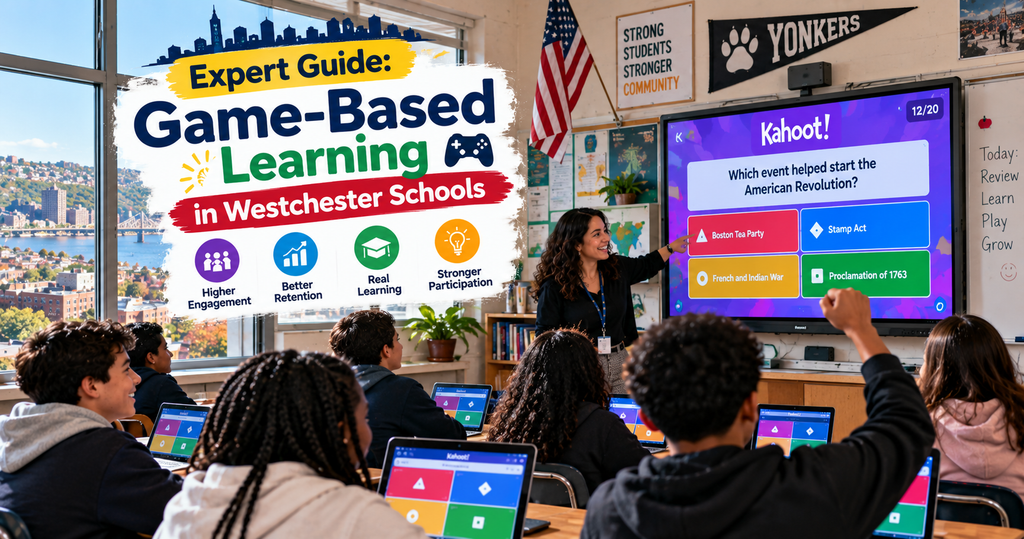
If you have a child in Yonkers Public Schools this year, chances are they’ve come home talking about a game their teacher had them play in class.
Kahoot. Blooket. Something with animals or wizards or code numbers you don’t quite catch. You nod, ask a follow-up question, and maybe wonder whether this is real learning or just a distraction dressed up as education. You’re not alone. Parents across Westchester County are having variations of the same conversation this school year.
This is the honest version — what game-based learning actually is, why Yonkers and other Westchester schools have embraced it, what real classrooms look like when it’s happening well, which platforms have earned trust across the district, and what parents can concretely ask their child’s teacher to understand how their student is being taught. Written for YPS families, parents in Bronxville, Tuckahoe, Eastchester, and the broader Westchester community trying to make sense of a shift in classroom teaching that happened faster than most families noticed.
Is Game-Based Learning Actually Worth Class Time?
Game-based learning is worth class time when it functions as targeted review and practice after direct teaching, not as a replacement for actual instruction. Research supports its effectiveness for engagement and content retention, but only when teachers use it thoughtfully. The parents who question whether it’s real learning aren’t wrong to ask — they’re just often asking about the wrong version of it.
A Yonkers parent I spoke with recently put it this way: “My son played a Blooket game about the Revolutionary War in class this week. That’s fine. But I want to know if he could tell me the causes of the Revolutionary War if I asked him at dinner. The game isn’t the point. The knowing is.”
That parent is asking the right question. The academic research generally supports him.
A 2023 meta-analysis published in the Journal of Educational Psychology looked at 45 studies of game-based learning across grade levels and found that these approaches improved content retention by roughly 20% compared to lecture-only formats. But — and this matters — the improvements only appeared consistently when teachers used games as reinforcement after direct instruction, not as replacements for it.
Yonkers Public Schools, like most large urban districts in New York State, has been adopting these platforms since 2020. The pandemic pushed even traditionalist teachers into experimenting with digital tools, and many of them stayed with the ones that worked after schools reopened. A YPS middle school teacher I’ve corresponded with described her Friday review sessions using Blooket as producing better test performance than her previous Friday review sessions using worksheets — and better engagement across the whole class, not just the students who liked school.
The New York State Education Department publishes guidance on educational technology use but doesn’t mandate specific platforms. That means individual schools and even individual teachers make most of the choices about which tools appear in Yonkers classrooms. Which is why one seventh-grade classroom might use three different platforms this week and the one next door might use none.
What this means for parents worried about whether classroom games are worth the time: the answer is usually yes, but only if the teacher is using the tool as a review layer rather than as the main instruction. Games that come after teaching produce learning. Games that replace teaching produce entertainment. Ask your child’s teacher which pattern they follow, and their answer will tell you what you need to know.
What Do These Games Really Look Like in Yonkers Classrooms?
Game-based learning in Yonkers classrooms typically means teachers projecting a game on their SMART Board or classroom screen while students play from their district-issued Chromebooks. Sessions run 10-20 minutes, cover material students have already been taught, and end with the teacher reviewing which questions the class got wrong. It looks less like recess and more like a fast-paced test disguised as fun.
Here’s a scene from a real YPS eighth-grade classroom this year, described by the teacher.
Third period, Tuesday morning. Students walk in, open their Chromebooks, and see today’s Blooket code on the board — a six-digit number. They go to a specific website, enter the code, and choose a nickname. Within ninety seconds, all twenty-four students are joined and waiting. The teacher confirms everyone is in, picks a game mode, and starts the session.
For the next fifteen minutes, students answer questions on their screens about the algebraic concepts they’ve been studying. The classroom sound is a low buzz — occasional groans at hard questions, small cheers at correct answers, students looking over at their neighbors’ screens. The teacher walks the room, glancing at student screens through the app’s dashboard on her tablet.
When the game ends, she pulls up the results. Question 4 was missed by half the class. Question 7 was missed by one specific student who usually aces algebra. The teacher spends five minutes reteaching Question 4 to the whole class and makes a note to check in with the student on Question 7. Total class time spent: about 25 minutes. Actionable diagnostic information generated: substantially more than a full-class quiz would have produced in the same time.
This pattern repeats across grade levels and subjects. The specifics change — younger students use different game modes, some teachers prefer Kahoot’s format over Blooket’s, high school teachers often use Quizlet Live or Nearpod instead — but the underlying rhythm is similar. Setup takes about a minute. Play runs 10-20 minutes. Review and reteaching happens immediately after.
For families whose children participate in these sessions regularly, understanding how they actually start can be helpful. When a teacher launches a Blooket session, students join by entering a Blooket code for classrooms — the six-digit number displayed on the classroom board. No student accounts required, no email addresses collected, no personal information shared. The code changes every session and expires when the game ends. This is one of the reasons the platform cleared privacy reviews across the district.
Not every teacher uses these tools this well. Some run games longer than they should, dragging engagement down. Some skip the review step at the end, which turns learning back into entertainment. But the teachers who use game-based platforms well — and most YPS teachers who use them at all fit this category — get real academic mileage out of them.
Which Platforms Are Actually Being Used in Westchester Schools?
The platforms most commonly used in Westchester schools including YPS are Kahoot, Blooket, Quizlet, Nearpod, IXL, and Khan Academy — with specific tools like Pear Deck and Newsela appearing more often in higher-resourced districts like Scarsdale, Bronxville, or Rye. Free tiers cover most classroom needs, though several districts pay for enterprise access to platforms like Nearpod or IXL.
Below is a comparison of the tools most likely to appear in a Westchester County classroom right now.
| Platform | Best For | Free Tier | Grade Focus | Notes for Westchester Districts |
| Kahoot | Live class polls, quick review | Basic version free | K-12 | Widely used across YPS and neighboring districts |
| Blooket | Longer review sessions, variety | Full features free | Grade 3-12 | Popular in YPS middle schools especially |
| Quizlet | Vocabulary, self-study, flashcards | Ad-supported free | Grade 5-12 | Standard for language and history classes |
| Nearpod | Full interactive lessons | Limited free | K-12 | Enterprise licenses common in well-resourced districts |
| IXL | Standards-aligned skill practice | School subscription | K-12 | Used heavily in some YPS schools with district licenses |
| Khan Academy | Deep academic content, SAT prep | Free, non-profit | K-12 | Reliable for at-home support across all grades |
| Pear Deck | Interactive slide-based lessons | Limited free | Grade 3-12 | Growing use in high schools |
| Newsela | Current events with reading level adaptation | Free tier | Grade 3-12 | Used in social studies and ELA classrooms |
| Prodigy Maths | Adventure-style math practice | Free tier | Grade 1-8 | Popular in elementary schools |
| Gimkit | Longer review, older students | Limited free | Grade 6-12 | Growing among high school teachers |
A few notes for Yonkers-specific context.
Kahoot has near-universal recognition across YPS teachers and students. It’s the platform most students grew up with and remains the fastest to deploy. Older students sometimes describe it as being for younger kids, so many middle and high school teachers mix in other options for variety.
Blooket has grown rapidly in YPS middle schools since 2022. Its multiple game modes let teachers run the same academic content through different experiences — a Tower Defense session one week, a Café mode the next — which keeps engagement fresh over months. The free tier is genuinely complete, which matters for a district with budget constraints.
Quizlet remains the go-to for vocabulary-heavy subjects. Language arts, world languages, historical dates, science terminology — all get sharper with the spaced repetition Quizlet handles well. Students often use it independently at home for their own studying.
Nearpod is used most heavily in Westchester districts with the budget for its enterprise licensing. Scarsdale and Bronxville see more of it than YPS in general. When teachers commit to it as their main lesson delivery platform, it works well; used casually, it doesn’t return the investment.
IXL appears in specific YPS schools where the district has purchased licenses, providing skill-mastery practice aligned to New York State standards. Some students find it dry, but its rigor is genuine.
Khan Academy is the reliable at-home partner across all these classroom tools. Free, non-profit, and covering K-12 comprehensively. Parents whose kids struggle with specific concepts can usually find Khan Academy videos and practice on exactly that topic.
Pear Deck and Newsela deserve mention. Pear Deck integrates with Google Slides to add interactive elements to presentations. Newsela adjusts news articles to different reading levels, making it useful for classrooms with mixed reading abilities. Both are showing up more in Westchester classrooms as teachers get more sophisticated with digital tools.
The specific combination varies by school, by teacher, and by subject. A Yonkers middle school teacher might combine Google Classroom for admin, Blooket for Friday review, Quizlet for vocabulary practice, and Khan Academy for at-home support. That stack covers most needs without adding complexity.
What Should I Ask My Child’s Teacher About This?
The most useful questions parents can ask their child’s teacher about game-based learning are practical rather than philosophical: which platforms is the class using, how often, for which subjects, what free versions can families access at home, and how the teacher measures whether the games are actually producing learning. Teachers who use these tools well can answer all of these easily.
Here’s a list of specific questions worth asking at the next parent-teacher conference or in an email exchange.
“Which platforms does the class use, and how often?” This tells you what your child is being exposed to. A teacher using two or three platforms consistently is usually well-organized. A teacher using ten different platforms erratically is usually struggling to keep up.
“Are the games used as review after teaching, or to introduce new material?” The answer here matters more than any other. Review-first teachers are using games well. Games-first teachers are usually not.
“Can I access the platforms at home to help my child practice?” Most major platforms — Blooket, Kahoot, Quizlet, Khan Academy — have free tiers parents can use with children at home. Reinforcing classroom platforms at home is one of the highest-leverage things parents can do for elementary and middle school students.
“How do you know whether these tools are actually helping my child learn?” The best teachers can point to specific data — game reports, test performance, individual student progress. Teachers who can’t answer this may be using the tools without measuring their effectiveness.
“Are these platforms approved by the district for privacy compliance?” YPS, like all New York State districts, must vet platforms under NYS Ed Law §2-d protecting student data. Teachers should know which of their tools are on the district’s approved list. Ones that aren’t may present concerns.
“What should I do if my child doesn’t respond well to competitive game formats?” Some children thrive on public leaderboards. Others shut down. Good teachers offer alternatives — team modes, hidden names, non-competitive tools. If your child expresses distress about specific formats, raising it usually produces accommodations.
“How does this affect the amount of screen time my child gets at school?” Realistic teachers will give you a rough number. Fifteen to thirty minutes of educational platform time per class period is common; longer sessions may need discussion.
“If my child is struggling in your class, are there specific platforms you’d recommend for extra practice at home?” Teachers who use these tools well often have specific recommendations for individual students. This question opens a targeted conversation about your child’s actual needs.
Most YPS teachers welcome these questions when asked respectfully. Parent engagement at this level tends to produce better outcomes for students than either indifference or hostility. The teachers using digital tools well want parents to understand what’s happening — because parent buy-in reinforces classroom learning.
Frequently Asked Questions
Is game-based learning safe for my child’s personal data?
Yes, when platforms are used through teacher-hosted sessions. Kahoot, Blooket, Quizlet, and Khan Academy all comply with the Children’s Online Privacy Protection Act (COPPA) and New York State Ed Law §2-d when students join via teacher-provided codes rather than personal accounts. YPS maintains an approved vendor list, and platforms undergo district IT review before classroom use.
What if my child is in a class where the teacher doesn’t use these tools?
Not every teacher uses game-based learning, and that’s not necessarily a problem. Strong traditional teaching produces excellent outcomes without gamified tools. If you’d like your child to have access anyway, you can install free platforms at home. Khan Academy, Duolingo, and Prodigy work well for family use independent of classroom adoption.
Are these platforms different from just letting my child play video games?
Yes, meaningfully. Educational game platforms are designed with pedagogy in mind — instant feedback on correct/incorrect answers, tracking of individual concept mastery, and content directly tied to academic curriculum. Entertainment games optimize for continued play. Educational games optimize for continued learning. The distinction matters, though both are technically games.
How much homework should be assigned on these platforms?
Reasonable teachers assign homework on educational platforms in doses similar to traditional homework — maybe 15-30 minutes for elementary students, longer for middle and high school. Homework that requires hours on a single platform usually isn’t well-designed. If you find your child spending excessive time on platform-based homework, it’s worth raising with the teacher.
What if my child doesn’t have reliable internet at home?
This is a real issue in some Yonkers neighborhoods and one YPS has worked to address. If home internet is limited, ask your child’s teacher whether homework can be adapted, whether school-based practice time is available, or whether the district offers loaned Wi-Fi hotspots. No student should be penalized for connectivity issues outside their control.
A Practical Note for Yonkers Families
Game-based learning in Yonkers schools is neither the miracle some educational marketers claim nor the distraction some traditionalists fear. It’s a set of tools that, when used well, adds meaningful engagement and diagnostic data to classroom teaching. When used poorly, it wastes class time. The variable that matters most isn’t the platform — it’s the teacher.
For families with children currently in YPS classrooms using these tools, the practical starting point is a conversation with your child’s teacher. Not a suspicious interrogation, but a genuine question about what platforms are being used and how you can support learning at home. Most teachers will welcome the engagement and share what they’re working with.
For families still forming opinions about whether this shift is good or bad, consider paying attention to your own child’s engagement more than to policy debates. A child who comes home excited about what they learned in a Blooket session — able to explain the material, ask follow-up questions, connect it to earlier lessons — is being educated. A child who plays daily but retains nothing is being entertained. Both outcomes are possible with the same tool. What separates them is how the tool is used.
Yonkers has a diverse, complex school system serving families across every income level, cultural background, and educational goal you can imagine. The technology being introduced into its classrooms won’t fix all of that. But it also won’t ruin it. What it will do is provide tools that, in the hands of good teachers, help more students engage with academic content than the previous methods managed to reach.
That’s a modest claim. It happens to be true. Parents who engage at that level of realism — neither overselling the tools nor rejecting them — tend to see their children benefit most from whatever mix of methods their teachers use.
Ask the questions. Look at the results. Adjust accordingly. That’s the whole framework, in Yonkers and everywhere else where these tools have quietly become part of how kids learn.