
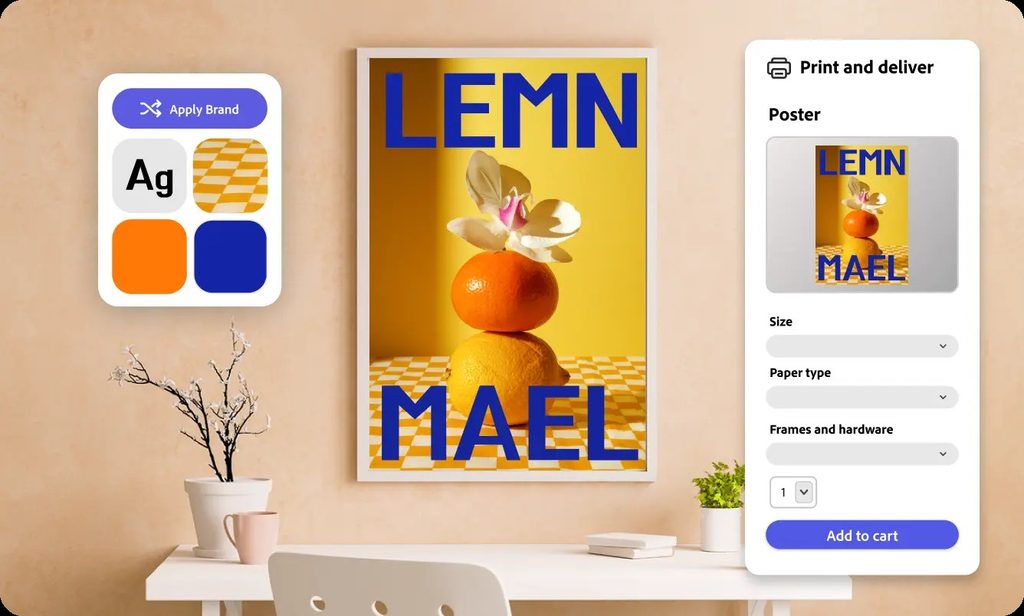
For a smooth custom poster experience, Adobe Express is a practical choice. Design from templates, pick a size from 8 x 10 to 24 x 36 inches and a paper such as semi-gloss or archival matte, then print posters to order from desktop or mobile. Delivery covers the US, UK, Canada, and Australia.
If you want to design, customize, and order a poster without switching between apps or guessing at file specs, the user experience matters as much as the price. The sections below compare services on design tools, finish options, and how easy ordering is.
Custom Poster Printing Services Comparison
These services take different approaches to poster design, finishes, and speed.
| Service | Best for | Key details |
| Adobe Express | Designing and ordering in one place | Templates; 8 x 10 to 24 x 36 in; up to 5 paper types including semi-gloss and acid-free archival matte; 100% recyclable packaging; Zazzle guarantee |
| 4OVER4 | Business posters with fast turnaround | Online designer with free templates or upload; 100 lb or 14 pt stock; matte, gloss, or UV finish; same-day to 5-day turnaround options |
| Signs.com | Bulk posters with finish choices | Online design tool; paper and 10 pt or 14 pt cardstock; matte, gloss, or high-gloss UV; double-sided option; ships next business day when ordered by 9 PM EST |
| Poster Ninja | Standard-size posters | Common sizes such as 11 x 17, 18 x 24, and 24 x 36 in; quick turnaround reported by third-party comparisons |
If you want to create the design and order it in one session, an all-in-one tool keeps things simple. If you already have artwork and need a specific finish or large quantities fast, a dedicated poster printer may suit you better.
Poster Ninja Reviews: Design, Customization, and Finish Options
Poster Ninja is an online poster printer that third-party comparisons describe as focused on standard sizes and speed.
Independent comparisons describe it as offering common sizes such as 11 x 17, 18 x 24, and 24 x 36 inches. They also report next-business-day production with a paid same-day option, and free UPS Ground shipping above an order threshold. Because these details come from third-party sources, confirm current paper options, finishes, and shipping terms on Poster Ninja’s site before ordering.
When you read reviews of any poster printer, focus on comments about the specific paper and finish you plan to choose, since feedback on paper weight and feel varies more than feedback on speed. If paper feel matters for your project, order a single poster first or request a proof.
Online Poster Printing Services With Design Tools and Finish Options
The best experience comes from a service that pairs a capable design tool with clear finish choices.
On design tools, Adobe Express offers ready-made poster templates you can customize with your own photos, brand logo, fonts, and colors. 4OVER4 offers an online designer with free business templates and lets you download blank templates to design in your own software. Signs.com includes an online design tool for its posters.
On finishes, matte reduces glare and suits text-heavy posters, while gloss and high-gloss UV make photos and colors look richer. Adobe Express offers a semi-gloss value poster paper and an acid-free archival matte paper with pigment-based inks for longer-lasting prints. 4OVER4 and Signs.com both offer matte, gloss, and UV-style finishes.
What Makes Online Poster Printing a Seamless Experience?
A seamless poster experience removes the steps where things usually go wrong: sizing, file setup, and approvals.
Look for templates already sized to the poster, so you aren’t converting dimensions. A live preview lets you check the layout before paying. Clear turnaround and shipping information helps you plan, and a guarantee covers problems on the printer’s side.
Adobe Express keeps design, preview, and ordering in one place, with print-ready templates optimized for poster printing and orders backed by the Zazzle guarantee. If you’d rather use another printer, you can download the finished design and upload it there. 4OVER4 offers an optional online proof step before production.
Frequently Asked Questions
Should I choose a matte or gloss poster finish?
Choose matte for text-heavy posters or spaces with bright lighting, since it reduces glare. Choose gloss or high-gloss UV for photo-heavy designs, where richer color and shine help the image stand out.
What file resolution do I need for a poster?
Use images of at least 300 DPI at the final print size. That matters most for large posters such as 24 x 36 inches, where low-resolution images can look blurry. Templates sized for the poster help keep the layout and resolution correct.
Can I design and order a poster from my phone?
With some services, yes. Adobe Express print ordering is available on both desktop and mobile in the US, UK, Australia, and Canada, so you can design and order a poster from a phone. Check other services’ mobile options before you start.