
A 99 percent “delivered” rate looks impressive until you check where those messages landed. Validity’s 2026 Email Deliverability Benchmark put global inbox placement at 87.2 percent in 2025, based on its customers’ seed tests, so roughly one message in eight landed in spam or went missing.
Gmail raised the pressure in November 2025, when it began ramping up enforcement, including temporary and permanent rejections, on bulk mail that does not meet its sender requirements: authentication, a spam rate kept below 0.3 percent, and one-click unsubscribe for marketing mail.
In this guide, we break down the 12 best email deliverability checkers: seed-list testers, spam analyzers, authentication auditors and provider dashboards. Each review covers what the tool actually checks and what it costs, so you can see where each send lands and fix issues before the next campaign.
Best email deliverability checker tools at a glance
Need a quick answer? Use this reference table to match your current goal with the tool built for it.
| What you need right now | Fastest starting point |
| A zero-cost baseline | InboxArmy free Email Deliverability Test |
| The broadest all-in-one feature set | GlockApps |
| API-based testing and live alerts | Mailgun Optimize |
| Enterprise monitoring across many mailbox providers | Validity Engage |
| Frequent testing on a clear public price | SendForensics |
| A simple preflight with a free tier | Unspam.email |
| Authentication-first troubleshooting | PowerDMARC Inbox Placement Analyzer |
| Spam testing inside email QA | Litmus Spam Testing (now part of Validity Engage) |
| A quick, free seed-list check | InboxAlly Placement Tester |
| Authoritative Gmail performance data | Google Postmaster Tools |
| DNS and blocklist triage | MXToolbox |
| A one-off message spam score | Mail-Tester |
Prices and free-tier limits change often, so check each vendor’s pricing page before you buy. The detailed reviews below cover strengths and trade-offs.
The 12 best email deliverability checker tools, reviewed
1. InboxArmy: best free starting point
The free Email Deliverability Test from Inbox Army is a seed placement test. You add a short code snippet to your email, send it to the test addresses the tool page lists, and the report shows whether the message reached the main inbox, the Promotions tab or the spam folder at Gmail, Outlook and Yahoo, among other providers.
The same report covers SPF, DKIM and DMARC results, a spam score analysis and blacklist status, and the tool also looks at your domain and IP reputation. The tool page lists no usage cap, and you can share a finished report with your team through a link. Because it tests a real send from your own platform, it reflects your actual setup rather than a scan of pasted HTML.
Use it as a free baseline before a big send or after a DNS change, then add a monitoring tool once you need scheduled tests or alerts.
2. GlockApps: best all-in-one checker
A GlockApps Inbox Insight test measures inbox placement across Gmail, Yahoo, AOL and Outlook and reports whether each copy landed in the inbox, a tab or spam, or went missing.
Beyond placement, the dashboard:
- Verifies SPF, DKIM, and DMARC
- Scores content with SpamAssassin
- Checks your sending IP against 50+ blocklists
- Offers an API for automated testing, plus PDF export and white-label reports
Pricing: the free plan includes two test credits, and paid plans start at $59 per month billed annually (Essential, with 360 test credits). Paid plans also add DMARC analytics plus uptime and IP reputation monitors. If you want one subscription that covers placement, diagnostics and ongoing monitoring, GlockApps is a strong all-round pick, though the data volume can feel heavy at first.
3. Mailgun Optimize: best for API-driven monitoring
Mailgun Optimize combines inbox placement testing (down to tabs and folders at major mailbox providers), blocklist and spam trap monitoring, and Google Postmaster Tools and Microsoft SNDS integrations. Mailgun can also send Optimize alerts to Slack.
Pricing: the Pilot plan costs $49 per month for 25 inbox placement tests; Starter costs $99 per month for 50 tests and adds blocklist monitoring (one IP and one domain), spam trap monitoring and the Google Postmaster Tools integration. Both plans list the first month as free. Tab-level results show at a glance whether Promotions hid your campaign.
Automation is the draw for technical teams: Mailgun documents an Inbox Placement API for creating seed tests and pulling inbox, spam, missing and Gmail tab results per provider, so tests can run from your own scripts.
The trade-off: test allowances are fixed per plan, which can feel tight for high-volume programs, and the entry Pilot plan leaves out blocklist and spam trap monitoring. For teams that already send through Mailgun, Optimize keeps placement and reputation data in the same account.
4. Validity Engage: best for broad, multi-domain programs
Validity Engage is Validity’s combined email platform, and the Everest deliverability tools and Litmus are now part of it. It tests inbox placement across 90+ email providers and breaks placement and throttling signals out by mailbox provider, which suits brands that run several streams, sub-brands or dedicated IPs.
Beyond placement, Engage covers blocklist monitoring with alerts, spam trap detection, Sender Score reputation tracking, SPF, DKIM and DMARC checks, and Microsoft SNDS data. Seeing a blocklist flag and a reputation shift in one view helps busy senders act before the damage spreads.
Pricing is custom and quoted on the features you need. If you run a single store on a shared IP, the scope is likely overkill. For groups juggling several sending reputations, Engage gives a unified view that smaller tools do not aim for.
5. SendForensics: best value for frequent testing
SendForensics follows a flat-fee model: the Brand plan costs $49 per month, or $39 per month paid annually, and allows unlimited tests under a fair-use policy of 1,000 deliverability analyses and 50 seed-list placement tests per sending domain each month.
The platform combines inbox placement testing, content analysis that flags words, phrases or code likely to trip spam filters, client previews and DMARC monitoring, so you can see the folder outcome and the likely cause in one place.
SendForensics describes its placement tests as covering Gmail, Outlook and other common providers without publishing a seed count, so ask about Gmail tab reporting before you buy if that detail matters to your program.
If your campaigns fire daily and your budget dislikes per-test fees, SendForensics keeps costs predictable while letting you test whenever you need.
6. Unspam.email: best accessible all-in-one preflight
Unspam keeps the report simple: a 0 to 100 spam score built from authentication (SPF, DKIM, DMARC), sender reputation, blacklists such as Spamhaus, SpamCop and Barracuda, and content signals, with each lost point explained. Its inbox placement test uses 10 seed mailboxes at Gmail, Outlook, Yahoo and other providers and shows whether mail reached the primary inbox, Promotions or spam.
Free tier: 5 spam tests, 3 inbox placement tests, 3 device previews and 5 email heatmaps each month, with no credit card required. Paid use is pay per test, with a $5 monthly minimum and rates that drop as volume grows, and it adds an AI assistant that suggests fixes and historical reports with three years of data retention.
Ten seed mailboxes cover the main consumer providers, which is enough for many lists. If you need a much larger seed panel or Microsoft SNDS data, choose a broader tool. For marketers who want a clear answer without wrestling a complex interface, Unspam is an easy on-ramp.
7. PowerDMARC Inbox Placement Analyzer: best authentication-led tester
PowerDMARC’s Inbox Placement Analyzer starts where many tools end: authentication. One test checks SPF, DKIM, DMARC and BIMI with pass or fail results, assigns a 0 to 100 domain security score, and shows placement at six major providers: Gmail, Outlook/Office 365, Yahoo Mail, Amazon WorkMail, Zoho Mail and Apple iCloud Mail.
The report lists pass/fail rows for each protocol and flags whether the message reached inbox or spam at every provider. If alignment is green yet placement is red, you know the problem lies beyond authentication.
Coverage is narrow, so treat it as a specialist probe, not a universal meter. The analyzer is built into the PowerDMARC platform, so check its plans page to see which tier includes it. When SPF records break or DMARC slips to “none,” this is a fast way to trace the fault before campaigns go live.
8. Litmus Spam Testing: best when deliverability lives inside email QA
Litmus brings spam testing into the pre-send checklist you already use for previews and link checks. Its spam test runs your email against major spam filters, including SpamAssassin and Barracuda, checks your sending IPs and domains against common blocklists, and validates SPF, DKIM and DMARC.
Litmus is now part of Validity Engage, and pricing is quoted through Validity’s sales team rather than a public rate card. Use Litmus when you want design QA and spam checks in one place, then pair it with a placement tool like GlockApps for cross-provider inbox insight.
9. InboxAlly Placement Tester: best simple free seed-list test
Need a fast verdict? InboxAlly gives you one free placement test per day across 16 tester inboxes at Gmail, Outlook and Yahoo, with no signup needed.
Copy the tester list into your sending platform, send a real campaign, and watch each tester inbox report Inbox or Spam, per provider, as the mail lands; results arrive in minutes. The trade-off is scope. Coverage stops at three providers, and the placement test itself does not grade authentication, blocklists or content (InboxAlly offers separate free spam checker and header analyzer tools for that), so treat the result as a directional pulse rather than a forensic report.
For launch-day confidence checks or quick dispute resolution between copy and dev teams, InboxAlly’s speed and zero friction are hard to beat. Escalate to a broader suite if you need deeper answers.
10. MXToolbox: best for blocklists and DNS triage
MXToolbox is a diagnostics workbench. Enter a domain or IP to get live results for SPF syntax, DKIM, DMARC policy, PTR, A and MX records, and a check against 100+ blocklists.
The free plan covers on-demand lookups and weekly blacklist monitoring for one domain. Paid Delivery Center plans start at $129 per month and add 30 inbox placement analyses a month, adaptive blacklist monitoring, DMARC delivery reports, recipient complaint reporting and mail-flow monitoring.
The free lookups do not show inbox placement; they diagnose infrastructure. Use them after a complaint spike or DNS change, then pair the findings with a seed-list tester, or the paid plan’s placement analyses, for full visibility.
11. Mail-Tester: best quick single-message spam score
Mail-Tester gives you an instant spam score out of 10. Send one copy of your email to the generated address, click to check your score, and see results based on SpamAssassin rules, DNS records and key blocklists. The report explains each deduction, such as a missing list-unsubscribe header, a broken link or an authentication problem, so designers can correct issues before a seed test.
Free quota: three tests within any 24 hours. Paid options start at $5 for a pack of 10 tests, and monthly plans start at $10 for 50 tests.
Remember, Mail-Tester predicts filter risk, not real inbox placement. Treat it as a first technical check, then confirm broad placement with a multi-provider seed list once the score is clean.
12. Google Postmaster Tools: best authoritative Gmail companion
Postmaster Tools is Gmail’s own dashboard, free to use and powered by first-party logs. After you verify your sending domain, you’ll see:
- A compliance status dashboard that checks you against Gmail’s sender requirements
- Spam rate (Google’s guidance: keep it below 0.1 percent)
- SPF, DKIM and DMARC authentication pass rates
- Delivery errors, feedback loop data and encryption status
Google is moving everyone to Postmaster Tools v2. The legacy Domain and IP Reputation dashboards will be retired, and the new Postmaster Tools API v2 is available, with the v1 API set to be retired. Data typically updates within 24 hours and covers only mail sent to personal Gmail accounts.
Postmaster Tools doesn’t predict placement before send and offers no insight into Outlook or Yahoo. Use it as a retrospective check on Gmail performance, then pair a seed-list tester like GlockApps or Mailgun Optimize for forward-looking inbox visibility.
What an email deliverability test can and cannot tell you
Delivery rate isn’t inbox placement
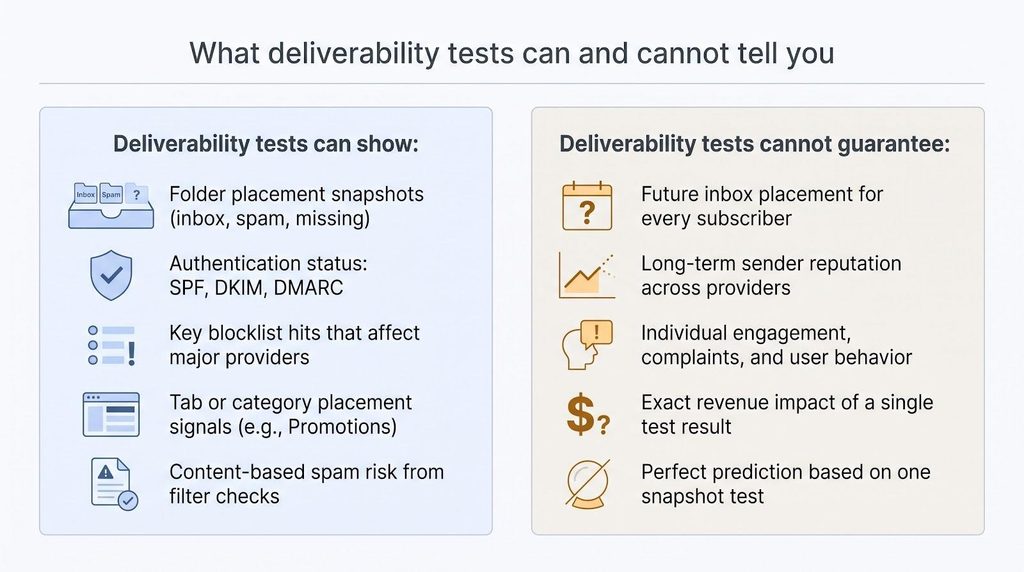
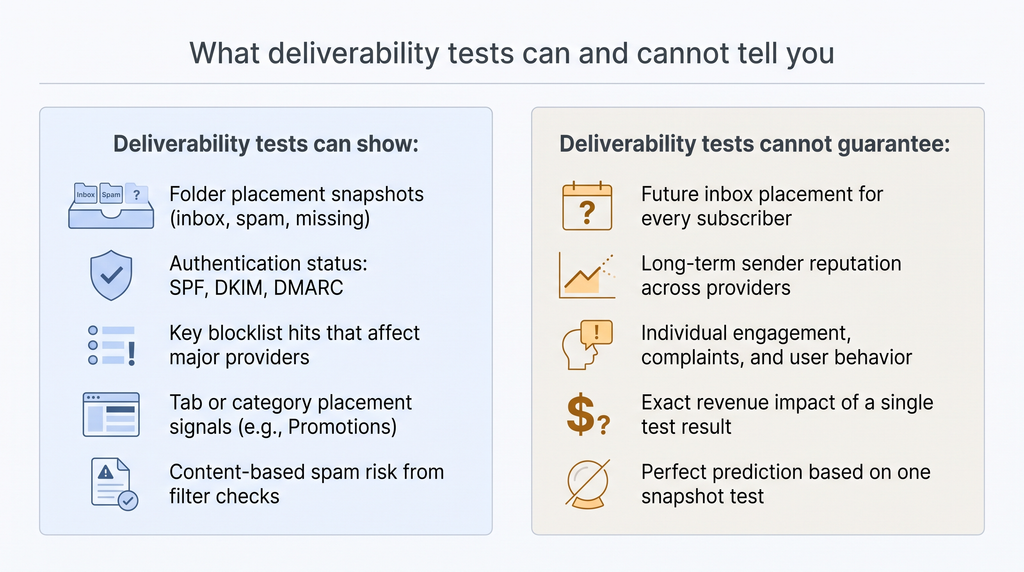
Your ESP’s 99 percent “delivered” stat only confirms that the receiving server accepted the message. It says nothing about the folder where the email landed. Folder placement, not SMTP acceptance, determines visibility and revenue.
Seed tests are snapshots, not crystal balls
Seed lists reveal how a sample of inboxes reacted at one moment. Real subscribers carry their own baggage: engagement history, complaint records, and personal filters. Treat three spaced runs as trend data, not gospel.
Passing SPF, DKIM, and DMARC doesn’t guarantee the inbox
Gmail’s sender requirements also cover one-click unsubscribe for marketing mail and a spam rate below 0.3 percent, and non-compliant bulk mail can be rejected. Authentication proves identity; reputation decides placement.
More blocklists ≠ better insight
A few widely used lists, such as Spamhaus, SpamCop and Barracuda, carry the most weight. A tool that checks 200 obscure lists can drown the signal in noise. Focus on the lists that matter and on tools that link to delisting steps.
Opens mislead after Apple Mail Privacy Protection
Apple’s privacy feature preloads images, so “opens” fire even if no one reads the email. Validate improvement with clicks, complaint rates, and first-party dashboards, not opens alone.
Inbox vs. spam is only the first hurdle
Gmail sorts mail into Primary, Promotions, Social, Updates, and Forums, while Apple Mail adds its own categories. A test that stops at inbox or spam can miss a campaign marooned in Promotions during a flash sale. Pair placement data with post-send metrics to confirm true visibility.
How to choose the right checker for your email program
If you send only a few big campaigns
Run a free diagnostic, InboxArmy or Mail-Tester, to catch obvious authentication or content errors. Follow with a three-provider seed test via InboxAlly to confirm Gmail, Outlook, and Yahoo placement. Review Google Postmaster Tools to spot complaint spikes. No ongoing dashboard required.
For Shopify, Klaviyo, or other automated-flow teams
Choose a tool that can test production messages on a regular schedule. GlockApps and Mailgun both offer APIs for automated placement tests, and Mailgun Optimize can push alerts to Slack. Prioritize Gmail tab reporting, one-click unsubscribe checks and complaint monitoring, because a complaint spike during a sale can hurt reputation fast.
For brands with multiple stores or IP pools
You’ll need domain-level and IP-level visibility across every sending stream. Validity Engage breaks placement out by mailbox provider and adds blocklist, spam trap and Microsoft SNDS signals; GlockApps lets you manage clients by projects and folders. Ask any vendor about multi-user access and Postmaster or SNDS integrations up front.
When authentication breaks
- Check DNS instantly with MXToolbox.
- Validate message-level alignment in PowerDMARC Inbox Placement Analyzer.
- Fix SPF (max 10 DNS lookups), rotate DKIM to 2,048 bits, and move DMARC from none to quarantine, then reject.
- Rerun the same seed test to confirm the repair.
When code, rendering, and spam tests must live together
Litmus Spam Testing sits inside the same QA workflow as its email previews. Use it for design sign-off, then run a broad placement check (for example, GlockApps) if folder visibility still matters.
When budget is tight
- Free baseline: InboxArmy or Mail-Tester.
- Free daily seed test: InboxAlly.
- Provider dashboards: Google Postmaster Tools, Microsoft SNDS.
- Pay for monitoring only when the revenue risk of a missed inbox exceeds the $49 per month entry price of SendForensics or Mailgun Optimize.
Climb that ladder only as each higher rung pays for itself in saved revenue or labour hours.
A safer, more reliable testing workflow
1. Send a neutral baseline.
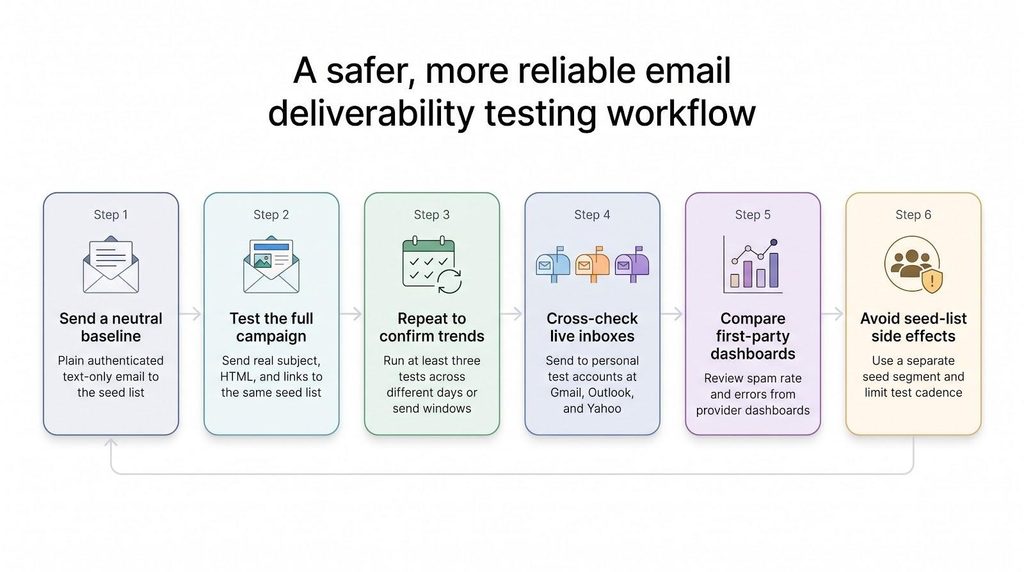
Start with a plain, authenticated message (text only, no tracking links or images). Send it from your production platform to the tool’s seed list. Repeat the same test three times on different days. If all three land in the inbox, infrastructure and reputation look sound.
2. Test the full campaign.
Swap in your real creative (subject, HTML, links) and send it to the same seed list at the planned launch time. Compare results with the baseline to isolate content-driven issues.
3. Repeat to confirm trends.
Run at least three identical tests across different days or send windows. Compare by provider, not just the blended score, and archive every report for pattern tracking.
4. Cross-check with live inboxes.
Maintain one personal test mailbox at Gmail, Outlook, and Yahoo. After each seed run, send the same message to these controlled accounts and record folder placement and time to arrival. Divergence signals personalization or filter quirks that need deeper review.
5. Compare with first-party dashboards.
After a campaign, pull Google Postmaster Tools, Microsoft SNDS, and Yahoo complaint data. When dashboard metrics confirm the seed-list trend, confidence rises. If they diverge, investigate list hygiene or engagement.
6. Avoid seed-list side effects.
Keep seeds in a separate segment, exclude them from engagement reports and automated flows, and avoid firing many identical tests in a short burst. A steady cadence, such as one baseline test per day plus a campaign-specific test shortly before launch, keeps results comparable.
Open-source tools such as SpamAssassin, DMARC report parsers and command-line DNS lookups cover most diagnostics, but none maintain a live seed network. Use them for technical triage, then rely on a commercial panel when you need cross-provider folder visibility.
Popular tools not ranked as full deliverability checkers
These resources appear often in deliverability threads, but none replace a cross-provider seed test that also checks authentication.
| Tool | What it does well | Key limitation |
| Sender Score | Provides a quick IP reputation snapshot from Validity | Shows past sender health; no per-message placement |
| Microsoft SNDS | Offers first-party Outlook telemetry on spam complaints and errors | Retrospective only; no pre-send insight |
| Yahoo Sender Hub + complaint loop | Delivers Yahoo’s version of Postmaster and a feedback loop | Mitigates complaints but cannot predict placement |
| Spamhaus lookup | Confirms critical blocklist hits in seconds | A clean result does not guarantee inboxing |
| Warm-up services | Gradually ramp volume on new IPs or domains | Build reputation; do not measure live folder placement |
| List validators | Remove bounces and risky addresses, protecting reputation | Improve list health, not folder destiny |
Use these tools as support acts. Pair them with a seed-list tester and an authentication audit for a complete picture.
Frequently asked questions
What is the most accurate email deliverability checker?
No single tool is perfect. GlockApps, Mailgun Optimize, and Validity Engage combine placement tests with diagnostics and first-party data, but each samples inboxes rather than measuring your entire list. Triangulate: run a seed test, confirm results with Google Postmaster Tools or Microsoft SNDS, and track live clicks and complaints.
Can an email pass SPF, DKIM, and DMARC and still land in spam?
Yes, authentication proves identity, yet placement also depends on complaint rate, recent engagement, blocklist status, and content.
Are free deliverability tests reliable?
They’re reliable for the checks they provide. InboxAlly’s free test shows Inbox or Spam at Gmail, Outlook and Yahoo, and InboxArmy’s free test adds authentication, spam score and blacklist results to its placement report. Use them as an early warning, then add a larger suite if you need scheduled monitoring or a bigger seed panel.
Will sending to a seed list hurt my reputation?
One or two seed sends per campaign is normal practice. Avoid sending dozens of identical tests in minutes, and keep seeds out of automated flows.
Why do different tools show different placement results?
Seed networks differ in mailbox age, engagement, and geography. Run multiple tests over time with more than one provider to see the trend, not the outlier.
Does a higher Sender Score guarantee inbox placement?
A healthy Sender Score is encouraging, but mailbox providers weigh many additional signals, including user engagement and recent spam reports.
How often should I test deliverability?
At minimum, test before major campaigns and after any infrastructure change. High-volume ecommerce brands often test weekly; automated-flow teams test after each template edit.
Does BIMI improve deliverability?
BIMI doesn’t guarantee inboxing. Its DMARC-enforcement prerequisite strengthens authentication, which indirectly supports better placement.
Conclusion
No single checker answers every question. Start with a free seed test that also checks authentication, spam score and blacklists, confirm the trend with Google Postmaster Tools and Microsoft SNDS, and add a paid monitoring tool when the cost of a missed inbox outweighs the subscription. Test before big sends and after every DNS or platform change, and judge results by provider over several runs rather than by one snapshot.