
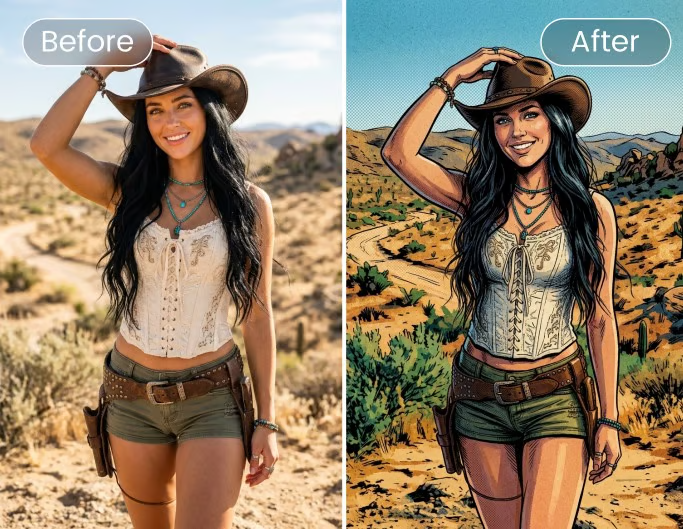
Visual content has become one of the fastest moving parts of any marketing, design, or ecommerce workflow. A single product launch might require a hero image, a handful of social posts, a banner ad, and a short video teaser, all within days of each other. As teams look for ways to keep pace, many are turning to platforms that bring image generation, editing, and preparation tools into one place, rather than juggling separate apps for each step.
This article looks at how creators, marketers, designers, and content teams can think through their options when choosing tools for image generation, editing, and asset preparation, and where a platform like AI Image Editor fits into that process.
What AI Image Editor Actually Offers Teams
For many teams, the biggest challenge is not a lack of tools, it is the number of disconnected tools required to move from an idea to a finished asset. AI Image Editor is built around this problem. Rather than positioning itself as a single model or a single technique, it functions as a workspace where teams can access different image model pages, editing tools, and preparation utilities depending on what a given task requires.
This matters because no single image model handles every situation equally well. A product photo that needs precise, controlled edits calls for a different approach than a stylized poster generated from a short text prompt. By organizing multiple model pages and utility tools in one place, AI Image Editor allows a team to move between approaches without switching platforms entirely, which can reduce friction when a project shifts from concept exploration to final production.
Text to Image, Image to Image, and Reference Led Editing
Most visual projects start with one of two questions: is there an existing image to work from, or is the goal to generate something new from a written description.
Text to image workflows are typically used early in a project, when a team is exploring concepts, testing directions for a campaign, or generating draft visuals for review. These workflows work well for ideation because they allow rapid iteration based on prompt changes alone.
Image to image workflows come into play once a team has a starting asset, such as a product photo, a rough sketch, or an existing marketing image that needs a new background, a different composition, or a stylistic update. This approach preserves elements of the original image while allowing targeted changes.
Reference led refinement sits between these two. Instead of generating purely from text, a team can supply a reference image, a mood board, or brand assets to guide the output more closely toward an established visual identity. This is particularly useful for marketing and ecommerce teams that need new visuals to remain consistent with existing brand guidelines, packaging, or product photography.
Choosing among these approaches depends less on which method is technically newer and more on the source materials available, the amount of creative control needed, and how much the output needs to match an existing reference.
Preparing Visuals for Product, Marketing, and Social Use
Once an image is generated or edited, it often still needs preparation before it is ready for use. Product visuals for ecommerce listings, for example, frequently require a clean background, consistent lighting representation, and sizing appropriate for a specific marketplace. Background removal tools handle the first of these steps, isolating a subject so it can be placed on a plain background or repurposed across multiple listings and formats.
Marketing creatives, including posters, thumbnails, and ad concepts, tend to have different requirements. These assets often need to work at various sizes, from a full banner down to a small thumbnail preview, which makes resolution and clarity important. Image upscaling tools are useful here, allowing a lower resolution or smaller draft image to be enlarged while maintaining reasonable detail, so the same asset can be adapted for different placements without regenerating it from scratch.
Social media images carry their own considerations, including platform specific aspect ratios and the need for visuals that read clearly even at small sizes on a phone screen. Teams generally benefit from testing how a generated or edited image looks at the actual size it will be displayed, rather than relying only on a full resolution preview during review.
Comparing Model Options, Including Nano Banana 2 AI Image Generator
Part of what makes a platform like AI Image Editor useful for teams is that it brings together several image model pages rather than committing to a single approach. This includes access to GPT Image 2, Seedream 5 Lite, and the Nano Banana 2 AI image generator, each represented through its own model page within the platform.
These models are not identical, and teams are generally better served by evaluating which one fits a specific brief rather than assuming one option is suitable for every task. Some models may handle certain stylistic requests, text rendering, or fine detail differently from others. A practical approach is to treat model selection the way a design team would treat choosing between different techniques or media, based on the desired output, the source assets available, whether a reference image is involved, and how much review and iteration the project allows for.
Because model behavior and licensing terms can differ, teams working on commercial projects should review the specific terms associated with each model page, along with AI Image Editor’s own platform terms, before finalizing assets for external use. This is particularly relevant when a project involves trademarks, copyrighted material, or the likeness of real people, all of which carry their own rights considerations independent of which tool was used to generate or edit an image.
Rounding Out the Workflow with Editing and Video Tools
Beyond static images, many campaigns now extend into short form video, whether for social platforms, product demonstrations, or ad placements. AI Image Editor supports video workflows including text to video, image to video, and reference to video, along with video editing, through its supported model pages. As with image generation, the right starting point depends on whether a team is working from a written concept, an existing image that needs to be animated, or a reference clip meant to guide style and motion.
Conclusion
There is no single correct path through image generation, editing, and preparation, since every project brings different source materials, brand requirements, and review processes. What matters more is having access to a range of workflows, from text to image generation through to background removal, upscaling, and video tools, and the ability to choose deliberately among them based on the task at hand. Platforms that consolidate these options can make that decision making process more manageable, provided teams remain attentive to licensing terms and rights considerations as they move assets from draft to final production.