
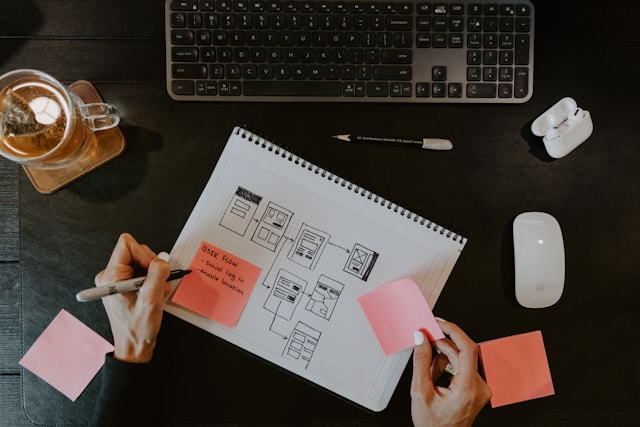
Designers love to fuss over colors, gradients, and the perfect corner radius, but when you sit with real users, none of that matters if they can’t finish the task they came for. A gorgeous interface that leaves people lost is still a failure. The heart of a strong product is the invisible path that quietly ushers someone from curiosity to completion, and that path is what we call the user flow.
Today, teams are shipping features faster than ever – thanks to component libraries, AI code completion, and tight release cycles – so the ability to see an end-to-end journey quickly, without waiting for live metrics, has become a competitive edge. Instead of guessing how a sign-up or check-out might feel, we can watch proven flows from products that already solved similar problems and borrow what works. This is research at the speed of design, and it is surprisingly accessible.Enter the library of user flow examples curated by Page Flows, a single place where you can watch the exact screens, micro-interactions, and decision points that guide real people through successful apps. One twenty-second clip of an onboarding sequence can reveal more than a dozen Dribbble shots because it shows pacing, copy tone, and tiny timing cues that screenshots can’t capture.
Thinking in Flows, Not Screens
It is tempting to design one page at a time, especially when you are deep inside Figma. The problem is that users don’t experience isolated pages – they experience momentum. Momentum comes from clarity about “what happens next” and confidence that they are still on the right track. Shifting your mindset from static layouts to continuous movement forces you to answer tough questions early:
- Which moment truly signals success to the user?
- Where might they hesitate or bounce?
- How can the interface reassure them before they even notice friction?
Those questions get fuzzy if you stare at a single frame. Studying complete flows grounds every typography choice in its larger narrative. You realize that a seemingly small detail, like placing a progress indicator one step earlier, can cut drop-offs because it reduces uncertainty sooner.
Four Insights You Gain from Watching Real Journeys
Before diving into specific patterns, it helps to call out the unique kind of knowledge you pick up by watching end-to-end recordings. You are not just “getting ideas”; you are building an instinct for rhythm and context that wireframes alone cannot teach.
Onboarding Pace and Timing
Spend ten minutes comparing onboarding flows from three high-growth apps, and a clear rule emerges: every extra field feels like a favor you are asking the user. Products that win respect introduce value in the very first step – often with a quick payoff, such as auto-detecting location or pre-filling email if the OS allows. Watching these flows shows exactly where they delay harder asks (credit-card entry, push notifications) until the user already feels invested. Restating the time reveals why there should be a two-screen spacing between “Welcome” and “Enable Notifications” increases the opt-in rates; the pause allows curiosity to develop, and then commitment can follow.
Micro-Interactions That Build Trust
Subtle animations, haptic taps, and smart defaults make a flow feel effortless, but copying them blindly can backfire if you miss their purpose. Recordings slow each micro-interaction to human speed. You see how long a spinner lasts, whether the icon pulses once or twice, and how the copy changes if the network lags. These details communicate reliability. After studying them, designers often replace generic loaders with context-aware placeholders (“Calculating your carbon footprint…”) and watch support tickets drop because users stop worrying the app is frozen.
Decision Points and Branch Logic
Every flow hides forks: “Do you need an invoice?” “Are you traveling with children?” Forks are where cognitive load spikes. Real examples show how world-class products reduce branching complexity. One travel app, for instance, asks about baggage only after choosing a seat, so the interface can auto-calculate allowed weight. The branching still exists, but it feels inevitable rather than intrusive. By inspecting those moments, you learn how to collapse optional steps, present defaults, or even delay certain choices until they are emotionally easy.
Error and Recovery Loops
We love the happy path, yet the true test of a flow is how gracefully it handles mistakes. Watching a refund request in action or a password reset on a busy subway ride exposes the emotional moments that no static mockup reveals. The best products apologize quickly, suggest a fix, and keep the user’s place in line. Seeing that choreography inspires designers to treat failure states as first-class citizens. The result is not just prettier error pages; it is a system that anticipates problems and guides users back without restarting the journey.
Bringing the Lessons Back to Your Own Work
There is no use in being inspired, and it dies in your bookmarks. When you are able to convert observed patterns into tangible project decisions, then the real payoff is received. Begin by drawing your present flow and the one referred to, step by step. Determine where you demand effort but do nothing to appreciate it. Is there any screen that you can combine, defer, or do away with?
Next, prototype any risky transition you spotted – like a multi-factor auth prompt or a shipping upsell – in hi-fidelity and run a five-participant test. Small sessions are enough because you already chose patterns with strong external validation; you are now checking fit, not feasibility. Record the test, then watch it the same way you watched the reference flow. Are users pausing? Scrolling back? Saying “wait, what?” aloud? Those moments are priceless flags you can refine before launch.
Finally, measure post-release behavior, but resist tweaking visuals until you confirm the journey is the issue. Too many teams repaint the room when the problem is the floor plan. Chart completion rates per step, time on task, and drop-off causes. If numbers still lag behind the reference flow, return to it and ask, “What critical promise are we fudging?” Often, it is a missing reassurance, an unclear CTA label, or a permission prompt that lands too early.
Conclusion
Studying real user flows is the fastest way to upgrade from screen decorator to experience architect. It sharpens your eye for momentum, exposes you to time-tested micro-interactions, and offers a library of solutions to common UX traps. More importantly, it reminds you that design happens between screens, in the split seconds where a user either feels guided or stranded.