
Walk down almost any commercial strip in Yonkers and you’ll find a small shop trying to keep up on social media. Short vertical videos are what the apps reward, and what most owners have the least time to make.
I help a few neighborhood businesses with their social posts, so I set up a test around a bakery I’ll call Pellbrook Bakery, a made-up family shop with a morning rush and no marketing staff. The question: can an AI video tool turn out 5 to 10 second promo clips good enough to post, and what does each usable clip cost? I ran six paid generations, five of them video, and logged time and price for each.
How the test worked
You can describe a scene in words and let the model invent it (text-to-video), or hand it a photo and ask it to bring that photo to life. A real shop would use its own phone pictures. Because Pellbrook doesn’t exist, I made one stand-in still with an AI image tool for 3 cents: cinnamon rolls on a wooden tray and two sourdough loaves on a marble counter. Even that step had a quirk. I asked for six rolls and got ten.
Each video was ordered at one of the two resolutions the tool offers, 480p or 720p. Every clip came with a soft background soundtrack, and turning sound on didn’t change the price.
Test 1: just words, no photo
My first prompt described a baker in a white apron pulling a tray of crusty loaves out of a deck oven at dawn, steam rising, warm window light. The four-second clip at 480p came back in about one minute and cost 26 cents.
The bread looked convincing, golden and crackly. But the baker I asked for never really showed up; a sleeve and a hand drift in at the very end. Fine for a generic “fresh bread” post, but it says nothing about who you are.
Test 2: bringing the shop’s own photo to life
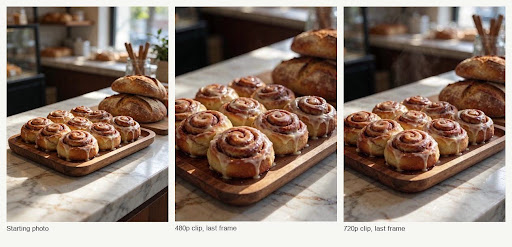
Next I gave the Seedance 2.5 Flash API the counter photo and asked for a slow push-in toward the rolls, glaze glistening, a little steam off the loaves, and nothing else changing. I ran the same request at both resolutions.
Left: the starting photo. Middle and right: the last frame of each five-second clip. All images are my own AI outputs; the bakery is fictional.
This was the most useful result. The camera glides in, the light shifts, and the rolls stay the same rolls: comparing first and last frames, I saw no extra pastries appearing or swirls rearranging, the usual giveaway. The 480p clip took 70 seconds and cost 33 cents. The 720p clip took 75 seconds and cost 72 cents.
Is 720p worth more than double? On a laptop, the glaze and the crumb of the sourdough are noticeably sharper. On a phone held at arm’s length, which is how nearly everyone will see it, I had trouble telling them apart. For daily posts I’d use 480p and save 720p for something that stays pinned to the top of the profile.
Test 3: people and lettering, the hard part
Most shop videos involve hands: passing a bag across the counter, ringing up a sale. So I asked for a six-second 720p close-up of a baker’s hands handing a white paper bag of rolls to a customer, with a chalkboard behind them reading “FRESH BREAD DAILY”. It cost 86 cents and took 61 seconds.
Two frames from the same AI clip: hands merging at 3.5 seconds, and the chalkboard misspelled at the end. My own AI output.
This is where it looked fake. The handoff never actually happens; both people just keep holding the bag. Around the three-and-a-half second mark, two hands seem to melt into one. The chalkboard got “FRESH” and “BREAD” right in most frames, but the third word, when it finally shows, reads “DAIY”. Anyone who pauses would spot it. I wouldn’t post this one.
The lesson for owners: keep people’s hands and printed words out of AI scenes, or use your own real photo as the starting point and let the tool add only gentle motion.
Test 4: a ten-second opening routine
Last, I asked for a ten-second vertical clip at 480p in three shots: the baker flips the door sign to OPEN, slides a tray of croissants into the case, and the first customer walks in from the dark street.
One frame from each of the three shots. My own AI output; these people do not exist.
It delivered all three shots, in order, in 68 seconds, for 63 cents. The sign flips from CLOSED to OPEN with both words spelled correctly, and the croissants look good enough to eat. Two things give it away. The baker and the customer both stare straight into the camera with the same polite smile, and the customer is a stock-photo kind of perfect. And of course these are not the people who actually work at the shop. Passing invented staff off as yours would mislead customers, so a clip like this should be labeled as AI-made or kept to the sign-and-pastry shots.
What it cost, and how it compares
All in, the test cost $2.82: five video clips plus the 3-cent still. Each clip took between one and two minutes to arrive, and none failed. The model’s price page lists roughly 6 cents per second of video at 480p and 14 cents per second at 720p, and my charges matched that within a few percent.
Three of the five clips were good enough to post: the oven shot, the 480p photo animation and the opening routine trimmed to its sign and pastry shots. That works out to under a dollar per usable clip. A half-day with a local videographer costs far more, but gets you footage of your real shop and staff, which no AI tool can. AI is good for quick filler between real posts, not for replacing them.
A weekly routine a busy owner could keep
On Monday morning, take three good phone photos of whatever comes out of the oven. Turn each one into a five-second clip at 480p with a simple instruction like “slow push-in, a little steam, nothing else changes.” Check every frame for extra items, odd hands or spelling. Add text and music in your phone’s editing app, not through the AI. Post one clip midweek and one on the weekend, and keep shooting real video of your team whenever you can.
Budget about $1 to $2 a week and fifteen minutes. If a clip shows anything that isn’t really in your shop, say it was made with AI. Your regulars will appreciate the honesty more than the polish.