
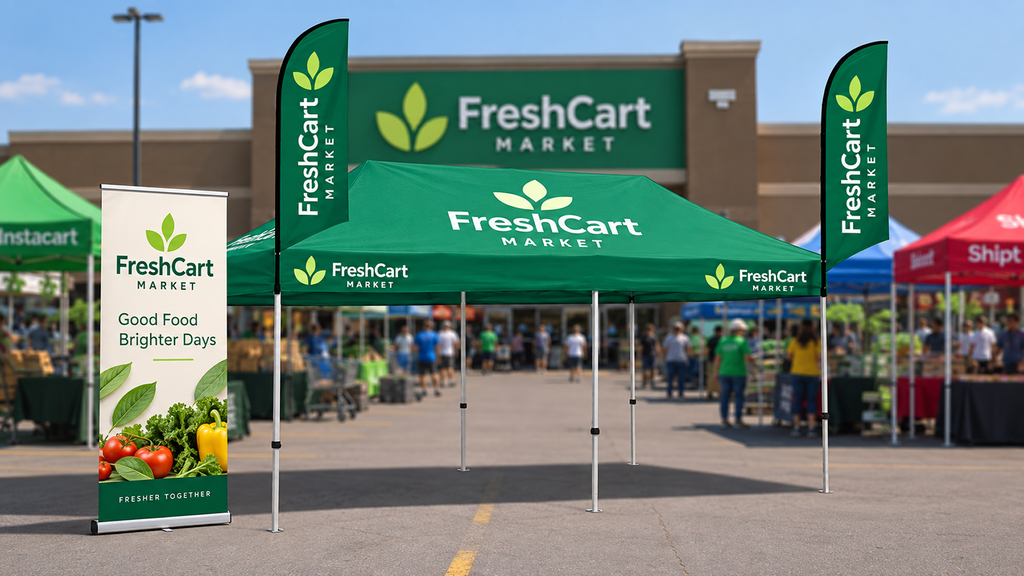
Learn how to combine a custom canopy tent and roll up banner to improve event branding, visibility, messaging, and visitor engagement.
A branded event space needs to be easy to recognize before visitors even reach it. A custom canopy tent can establish that first visual connection, while a roll up banner can provide more specific information once attendees move closer.
This combination can work well at trade shows, festivals, sporting events, community gatherings, outdoor promotions, and other U.S. events. The key is not covering every available surface with graphics. Instead, each display should have a clear purpose.
How a Custom Canopy Tent Builds Brand Recognition
A canopy is often one of the largest elements at an outdoor event, which makes it useful for establishing a company’s identity from a distance.
The main tent graphics can include:
- Company logo
- Business name
- Brand colors
- Short tagline or message
- Simple supporting imagery
This information should remain easy to recognize from different directions.
Think of the canopy as the visual anchor of your event setup. It tells attendees who is occupying the space before they need to know every detail about the products or services being promoted.
More detailed information can then be handled by supporting displays.
What Role Does a Roll Up Banner Play?
A roll up banner can act as a focused information point within the larger branded environment.
Instead of repeating the company name and logo, use the banner to answer the next question a visitor may have:
What does this business offer?
Depending on the event, the banner could highlight:
- A featured product
- A specific service
- A new offering
- Product benefits
- An event promotion
- A QR code
- A simple call to action
This creates a natural information sequence:
Canopy: Recognize the brand
Banner: Understand the offering
Product display: Explore it
Staff: Ask questions
CTA: Take the next step
Where Should You Position the Roll Up Banner?
Banner placement should follow attendee movement rather than simply filling an empty area.
Near a Front Corner
A front corner can give the banner visibility from the main walkway while keeping the entrance open.
This location can work well for a featured product or short promotional message.
Along a High-Traffic Side
If most attendees walk past one side of the tent, position the banner toward that traffic.
A display facing the main pedestrian route can communicate with people who may not initially intend to enter the tent.
Inside the Canopy
An interior location is better suited to visitors who have already entered the space.
Here, the banner can provide additional product information, explain a service, or support a demonstration.
Design the Display Around Viewing Distance
An event display is viewed from multiple distances, so the information hierarchy should change accordingly.
From Far Away
The primary objective is recognition.
The canopy should make the company identifiable through its logo, colors, and overall visual design.
From the Event Aisle
Visitors should begin to understand what the company does.
A strategically positioned banner can introduce the main product, service, or event message.
From Inside the Tent
Attendees can explore more detailed information.
Product samples, brochures, QR codes, demonstrations, and conversations can provide the deeper information that does not belong on the main canopy.
This layered approach keeps the event setup informative without making the graphics overwhelming.
Give Each Display a Different Message
Using identical messaging across the tent and banner can make the setup feel repetitive.
Instead, assign a role to every element.
| Display Element | Communication Role |
| Custom canopy tent | Brand recognition |
| Roll up banner | Focused product or service message |
| Product display | Demonstration or exploration |
| Counter | Visitor interaction |
| Brochure | Detailed information |
| QR code | Digital next step |
This structure allows the visitor to move naturally from awareness to interest and then toward further engagement.
Use Event-Specific Banner Messaging
Your canopy can remain consistent while the banner changes according to the event.
For example, a company might use the same branded tent at several events but change the banner message:
| Event | Suggested Banner Focus |
| Trade show | Featured product |
| Outdoor festival | Popular product or service |
| Sporting event | Sponsorship or brand message |
| Community event | Local offering |
| Product launch | New product |
| Networking event | Core business service |
This makes the display more adaptable without requiring an entirely new event setup for every occasion.
Create a Consistent Visual Connection
The tent and banner should look like they belong to the same brand.
They do not need to use identical artwork. Instead, carry recognizable elements across both displays.
Consider maintaining consistency with:
- Logo placement
- Brand colors
- Typography
- Photography style
- Graphic elements
- Messaging tone
For example, if the canopy uses a clean and minimal design, the banner should follow the same visual direction instead of introducing unrelated colors or decorative elements.
A consistent visual system makes the complete display easier for attendees to recognize.
Keep the Banner Easy to Scan
Trade show and outdoor event attendees are often moving when they first encounter a display. A banner filled with long paragraphs can therefore be difficult to process.
A practical structure is:
Clear Headline
State the main idea immediately.
Short Supporting Message
Explain the product, service, or benefit in a few words.
Relevant Visual
Use a product image or graphic that supports the message.
Simple Call to Action
Tell interested visitors what to do next.
The banner should encourage further interaction rather than attempt to provide every detail about the business.
Plan for Real Visitor Movement
Imagine your event setup before printing the graphics.
A visitor approaches from the left. What do they see first?
Another person walks directly toward the entrance. Is the company easy to identify?
Someone enters the tent. Can they quickly find the product or information they are interested in?
Staff members also need enough room to move and have conversations.
A display that looks attractive but blocks the entrance or creates a narrow passage can make the space less functional.
Test the Setup Before the Event
If possible, assemble the canopy and banner before the event.
Check the setup from several positions:
- Across the walkway
- From the main entrance direction
- From the side
- Several feet away
- From inside the tent
Look for anything that is hidden, difficult to read, or competing for attention.
Taking a few photographs from attendee-level viewpoints can also reveal problems that are difficult to notice while standing directly beside the display.
Common Branding Mistakes to Avoid
Repeating the Same Message
Let the canopy establish the brand and use the banner for supporting information.
Using Too Much Text
Prioritize one main idea instead of creating a full information panel.
Ignoring Side Visibility
Attendees may approach from multiple directions, especially at outdoor events.
Blocking the Entrance
Keep visitor pathways open and comfortable.
Mixing Different Design Styles
Unrelated colors, fonts, and graphics can make separate display pieces look disconnected.
Adding Displays Without a Purpose
Every banner or accessory should contribute something useful to the visitor experience.
Final Thoughts
A custom canopy tent can provide the foundation for a recognizable event presence, while a roll up banner can add focused information without changing the primary tent graphics.
The most useful approach is to think about the visitor journey. Let the canopy create recognition, position the banner where relevant attendees can see it, and use product displays, staff conversations, and digital resources for deeper information.
For U.S. businesses attending trade shows, festivals, sporting events, community gatherings, and outdoor promotional events, this combination can provide a flexible branding system that can be adapted to different audiences and event objectives.
Good event branding is not about adding the most graphics. It is about making the right message visible at the right point in the visitor’s journey.
Frequently Asked Questions
What is a custom canopy tent used for?
A custom canopy tent creates a branded space for outdoor events and promotional activities. It can display a company’s logo, colors, business name, and other visual branding elements.
Can a roll up banner be used with a custom canopy tent?
Yes. A roll up banner can complement the canopy by presenting a specific product, service, promotion, or call to action.
Where should a roll up banner be placed?
It can be positioned near a front corner, along a side facing event traffic, or inside the tent. The best location depends on attendee movement and the purpose of the banner.
Should the tent and roll up banner have identical graphics?
No. They should have consistent branding, but the banner can communicate different information. This prevents the display from becoming repetitive.
How much text should be placed on an event banner?
Keep the main message concise and easy to scan. A strong hierarchy usually includes a headline, short supporting copy, relevant imagery, branding, and a clear call to action.
Can the same canopy be used at different events?
Yes. A branded canopy can provide a reusable foundation while banners and other supporting graphics can be changed according to the event, audience, or promotional objective.
How can I make my canopy display more noticeable?
Use clear branding, readable graphics, strong visual hierarchy, and placement that considers attendee traffic. The canopy should establish recognition while supporting displays provide more specific information.