
Networks keep businesses running. Your applications, your team, your customer data — it all flows through the network. And that openness is a problem. The attack surface is often larger than it looks — and the network is a big part of that. What a firewall does is decide what traffic gets through — and what gets turned away.
Not every firewall does the same job, though. The difference between a useful purchase and one that just looks good on a spec sheet usually sits in what each feature actually does — and whether any of it fits your environment.
Understanding Network Firewall Technology
A network firewall watches traffic and applies security policies to it. Whether it runs as a hardware box or a cloud service, it sits between your network and everything else. These network firewall technology basics are worth reading if you want more on how firewalls regulate connections.
The basic ones just check addresses and ports. More advanced ones dig into applications and spot suspicious patterns — feeding into your broader security tooling so things that slip past the boundary don’t go unnoticed. What you actually need depends on your network size and compliance requirements. Honestly, how much operational complexity you’re willing to take on plays into it too.
7 Key Network Firewall Features
1. Traffic Filtering and Access Control
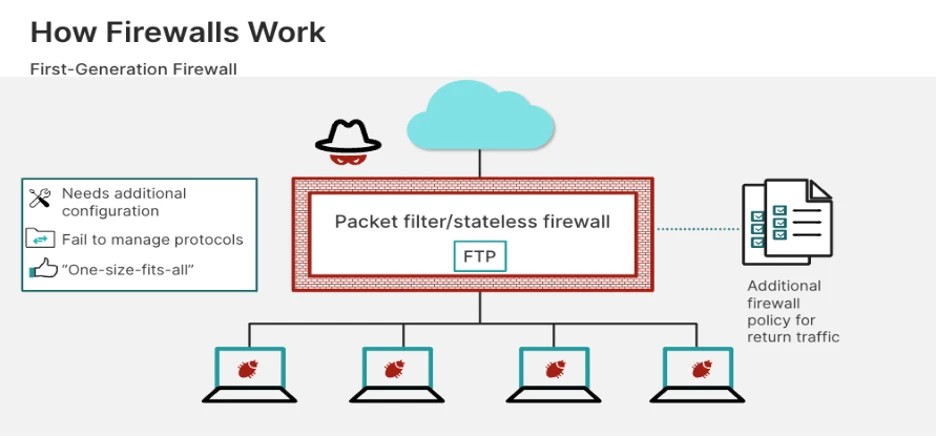
Traffic filtering is where it all starts. It checks addresses against your rules — port numbers, protocols — and acts on whatever policy you’ve set. Right there at the boundary, the connection either gets through or it doesn’t. Getting the rules right is the hard part — the concept itself isn’t complicated.
Then there’s access control — who gets to reach what. Your website might be open to anyone. Internal databases? Not a chance. That’s the whole point of the separation.
Stick to least privilege. Allow only what specific tasks actually require — because too broad and you’re opening up systems that have no business being exposed, while being too tight breaks real work. Neither is great — so review rules regularly and keep the balance honest.
2. Stateful Inspection
Stateful inspection means the firewall keeps track of active sessions — not just addresses. So when data comes in, it asks a simple question: is this part of something already underway, or is it arriving out of nowhere?
That matters more than you’d think. When someone opens a permitted connection to an external service, the return traffic gets recognised as part of that session. Anything that just turns up uninvited gets treated very differently.
Worth being clear on what it doesn’t do, though. It can’t tell you whether what’s moving through a permitted connection is actually safe. That’s a separate problem — and a common misconception.
3. Application Awareness and Control
Here’s what a lot of businesses miss: port numbers don’t tell you what’s actually running on them. Modern firewalls can identify applications directly — applications running on standard ports are far more varied than most people realise — which gives security teams something more useful to work with than just protocol and port.
Practically, that means you can allow approved collaboration tools while blocking applications that eat bandwidth or introduce unnecessary risk. You can apply different rules to business-critical services and nonessential traffic — and actually enforce the difference.
In practice, effectiveness still rests on configuration. Check it actually works for your environment before you sign anything.
4. Intrusion Prevention and Threat Detection
Some advanced firewalls include what’s called an IPS — a system that watches for traffic patterns that look like known attacks and tries to stop them before they land. Outright blocking is one option. Others flag and escalate. All sorts of approaches, really. None of it works if whoever sold it to you isn’t keeping the detection rules current.
Honestly, no firewall catches everything. Pair these with endpoint protection and strong authentication. Make sure everyone actually knows what to do when something goes wrong — not just what tools are running. A firewall generating alerts nobody reads isn’t worth much. Check them. Act on them.
5. Network Segmentation Support
Your network gets divided into zones — employee networks, guest Wi-Fi, finance systems, production servers, the lot. Firewalls control what moves between those zones instead of letting everything talk to everything, which is how a single compromised device can quickly become a much bigger problem.
If one device gets compromised, that’s the zone the attacker is stuck in. Guest devices stay away from internal applications. Servers with sensitive data only talk to systems that actually need them. That’s the separation working as intended.
This is one of the most underused protections in smaller businesses, frankly. Start by mapping your important assets. Work out which ones actually talk to each other — and which ones have no business doing so. Clear segmentation policies cut unnecessary access — and that’s exactly what attackers go after. That map is where sensible segmentation starts.
6. Logging, Monitoring, and Reporting
Logs matter. But only if someone’s actually reading them. Your firewall records what it allowed, what it blocked, what it flagged — repeated access failures, login attempts that don’t add up, the kind of thing that’s invisible until it isn’t. So who’s reviewing yours?
Centralised dashboards help surface those patterns across multiple locations. If you’re running a SIEM, pulling firewall events into it means you can spot connections between alerts that would otherwise look unrelated. That’s genuinely useful. Without it, you’re mostly reacting.
But infrastructure alone doesn’t do it. Set your alert priorities. Decide how long you’re keeping records. Protect the log data itself — it’s only there when you need it if you’ve been looking after it. Without that, it’s just background noise.
7. Performance, Scalability, and Centralised Management
A slow firewall isn’t protecting you — it’s just a different kind of problem. Tests with security features actually turned on, not just switched off to hit a spec sheet number. How does it hold up when traffic spikes — as you add offices, move more to the cloud? Worth finding out before you’re committed to it.
Centralised management means you’re not updating rules in five different places by hand. That matters more than it sounds when things change fast.
Before committing, look at licensing costs separately from support terms — what’s included isn’t always obvious, and that tends to bite people later. Hardware requirements get overlooked. So does integration with existing tools — and honestly, there are all sorts of compatibility issues that only surface once you’re actually mid-deployment. A feature-rich product isn’t the right call if the performance or budget doesn’t work. The firewall security considerations published by the Canadian Centre for Cyber Security are worth reading before you finalise any architecture decisions. .
How to Choose the Right Firewall Features
Start with what you’re protecting. Map critical systems and likely threats before looking at any product. A small office with ten people has a very different problem from a multi-site business with cloud workloads and sensitive data. Start there.
In practice, comparing solutions comes down to whether the documented performance holds with security features switched on, and whether it actually works with what you already have. For broader context on how firewalls fit into a layered network security architecture, this guide to zero trust network architecture is worth reading alongside any vendor evaluation.
Test policies before broad deployment. Make sure the people managing the firewall actually know how to maintain it — that part gets overlooked more often than you’d think.
Check whether it handles remote access securely and can look inside encrypted traffic where that’s needed. But be realistic — inspecting encrypted traffic has a performance cost, and there are privacy considerations too. A pilot tends to surface problems like that long before you find out the hard way at scale.
And review configurations regularly. Applications change. Access requirements shift. Outdated permissions have a habit of just hanging around — and routine audits are the only way to catch them.
Final Thoughts
Firewalls do more than block traffic. Used well — with proper segmentation and someone actually reviewing what it flags — a firewall makes a real difference to how hard your network is to get into. A lot of that capability goes unused. It’s worth actually switching it on.
Use it well. Keep policies updated. One layer in a broader strategy — not the whole answer. No single tool is.
Frequently Asked Questions
1. What is the difference between a traditional and next-generation firewall?
A traditional firewall filters traffic based on IP address, ports, and protocols while a next-generation firewall has additional capabilities like application control, intrusion prevention, and threat detection.
2. How often should firewall rules be reviewed?
Firewall policies must be checked on a periodic basis and after any significant network modification. Old permissions must be deleted, and access must be restricted where it is not necessary.
3. Can a firewall prevent all cyberattacks?
No. Firewalls can block some attacks but not all of them. Use them along with endpoint protection, multi-factor authentication, and continuous monitoring.
4. What should businesses consider when upgrading a firewall?
Security aspects, performance, scalability, centralized management, compatibility, cost, and support should be considered while selecting a firewall.